
Showing posts with label Samsung. Show all posts
Showing posts with label Samsung. Show all posts

- Download Samsung drivers
- Download N910CXXU1BOB4 firmware (Android 5.0.1) for the Galaxy Note 4 SM-N910C
- Download Odin v3.09
- Charge your battery to at least 80 percent
- Enable USB Debugging in Settings > Developer Options (in case you need to troubleshoot later)
- Backup your essential data for safe keeping

Install Lollipop on Galaxy Note 4 SM-N910C instructions
1. Unzip the firmware zip file that you downloaded on your computer.
2. Launch Odin.
3. Turn off your Note 4 and re-start in download mode (press Volume Down + Power + Home button).
4. Connect your Galaxy Note 4 via USB cable to your computer and wait for Odin to recognize it (a blue box should appear in ID:COM).
5. Make sure only Auto-Reboot and F.Reset Time are checked in Odin.
6. Make sure Re-Partition IS NOT CHECKED.
7. Click the AP button and locate the tar.md5 file in the unzipped firmware file, then click Start.

8. Wait patiently until the procedure ends and do not disconnect your Note 4. It may take a while.
9. You should see a green PASS message when successful.
10. Once your Galaxy Note 4 restarts, you should be running Android 5.0.1 Lollipop.
Credit: www.sammobile.com

Samsung Russia is reported to have started seeding the official Android 5.0.1 Lollipop
update for the Exynos 5 octa-core running Galaxy S4 (GT-I9500).
update for the Exynos 5 octa-core running Galaxy S4 (GT-I9500).
Weighing in at 1049MB, the update seems to be so big that Samsung will be removing
some pre-loaded apps like Google Play Books, Movies and others to make space.
However, these apps can be directly downloaded from Play Store.
some pre-loaded apps like Google Play Books, Movies and others to make space.
However, these apps can be directly downloaded from Play Store.
Galaxy S4 users in Russia should receive the OTA notification. The update is still
unavailable on the Kies server.
unavailable on the Kies server.
Meanwhile, recognised XDA contributor, AL_IRAQI has managed to capture the official
update and has shared the download link for the Russian Lollipop firmware. This Android
Lollipop firmware with build I9500XXUHOA7 can be flashed using the Odin flashing tool.
update and has shared the download link for the Russian Lollipop firmware. This Android
Lollipop firmware with build I9500XXUHOA7 can be flashed using the Odin flashing tool.
.jpg)
If you are interested in installing the Android 5.0.1 I9500XXUHOA7 Lollipop official
firmware on your Galaxy S4 head over to the installation guide below.
firmware on your Galaxy S4 head over to the installation guide below.
Pre-requisites
- Install proper USB drivers for your Galaxy S4 on the computer.
- Create a backup of all the data of the phone using any custom recovery.
- Enable USB Debugging Mode on phone to connect it with the computer and use Android SDK with it. [Navigate to Settings>> Developer Options>> check the USB Debugging option.]
- Your Galaxy S4 should have above 80% battery charge.
- The device should be factory unlocked.
- The phone will lose custom ROM once the stock update is installed. Also, the custom recovery will be replaced by the stock version.
- Your Galaxy S4 will no longer belong to a rooted version with the installation of official firmware.
- Android 5.0.1 Lollipop I9500XXUHOA7 works only with Galaxy S4 I9500. As flashing this on any incorrect variant might brick the device, verify the model number by navigating toSettings>> About phone>> Model number and then install firmware based on the model number.
- IBTimes UK will not be held liable for any damage to the device.

Download files:
or, from here
How to install official Android 5.0.1 Lollipop I9500XXUHOA7 update on Galaxy S4
(I9500)
(I9500)
Step-1: Extract the downloaded firmware zip using any extracting tool
Step-2: Extract the Odin zip to get Odin3 v.3.09.exe with a few other files
Step-3: Power off the Galaxy S4
Step-4: Enter into Download Mode by pressing and holding Home, Power and
Volume Down buttons together
Volume Down buttons together
Note: Ensure that you have installed the proper USB drivers installed on your PC.
Step-5: Launch Odin as Administrator on the computer. Click on the Odin tool then
right-click and select Run as Administrator from the drop down menu
right-click and select Run as Administrator from the drop down menu
Step-6: Connect the S4 to the PC using USB cable while it is in Download mode.
Wait for some time until Odin detects the device. When the phone is connected
successfully, the ID: COM box in Odin will turn light blue with the COM port number.
This step might take some time
Wait for some time until Odin detects the device. When the phone is connected
successfully, the ID: COM box in Odin will turn light blue with the COM port number.
This step might take some time
Step-7: In Odin select the files in the following order
- Tap on the BL button and select BL_I9500XXUHOA7-CL3943544_QB3767100_REV00-user_low_ship.tar.md5
- Tap on AP button and select AP_I9500XXUHOA7-CL3943544_QB3767100_REV00-user_low_ship.tar.md5
- Tap on CP button and select CP_I9500XXUHOA7-CL3943544_QB3767100_REV00-user_low_ship.tar.md5
- Tap on CSC button and select CSC_SER_I9500SERHOA7_ CL3943544_ QB3767100_REV00-user_low_ship.tar.md5
.jpg)
Step-8: Enable Auto Reboot and F.Reset Time checkboxes in Odin. Ensure Re-Partition checkbox is not checked
Step-9: Double check everything and click the Start button in Odin
Step-10: The installation should start now. It would take about five minutes to complete
the installation. Once the process is completed, the phone will restart automatically.
When you see the home screen on the phone, disconnect the phone from the computer
the installation. Once the process is completed, the phone will restart automatically.
When you see the home screen on the phone, disconnect the phone from the computer
Your Galaxy S4 should now be running I9500XXUHOA7 official build based on Android
5.0.1 Lollipop. Navigate to Settings>> About phone to verify the Android version of the
handset.
5.0.1 Lollipop. Navigate to Settings>> About phone to verify the Android version of the
handset.
[Source: XDA]

No leak firmware anymore, as Samsung officially brings out Android 5.0 Lollipop
upgrade for the Exynos 5 (octa-core) powered Galaxy Note 3 SM-N900, which runs
Android 4.3 Jelly Bean out-of-box.
upgrade for the Exynos 5 (octa-core) powered Galaxy Note 3 SM-N900, which runs
Android 4.3 Jelly Bean out-of-box.
The update is currently live for users in Russia with build version N900XXUEBOA6,
which brings all the Android Lollipop goodies such as a redesigned interface and native
apps, improved performance, heads-up and lockscreen notifications.
which brings all the Android Lollipop goodies such as a redesigned interface and native
apps, improved performance, heads-up and lockscreen notifications.
You should receive the notification for the update soon once it becomes available in your
region. To manually update your device head over to Settings>> About phone>>
Software Update. Also, keep in mind that your Note 3 is connected to a stable
Wi-Fi network.
region. To manually update your device head over to Settings>> About phone>>
Software Update. Also, keep in mind that your Note 3 is connected to a stable
Wi-Fi network.
You can also manually install N900XXUEBOA6 stock build, which is an unbranded
firmware, on your Galaxy Note 3 following our installation guide.
firmware, on your Galaxy Note 3 following our installation guide.
Firmware details
- Model name: Galaxy Note 3
- Model number: SM-N900
- Country: Russia
- Version: Android 5.0 Lollipop
- Changelist: 3779962
- Build date: 13 January
- Product code: SER
- PDA: N900XXUEBOA6
- CSC: N900SEREBOA6
- MODEM: N900XXUEBNL6

Pre-requisites
- Ensure that you have a proper USB driver for your Galaxy Note 3.
- Install USB Drivers for Galaxy S5 to connect the Android device with the computer.
- Enable USB Debugging Mode on phone to connect it with the computer and use Android SDK with it. [Navigate to Settings>> Developer Options>> check the USB Debugging option.]
- Create a backup of all the data of the phone through any custom recovery.
- The battery level of your Galaxy Note should be above 80%.
- The device should be factory unlocked.
- The phone will lose custom ROM once the stock update is installed. Also, the custom recovery will be replaced by the stock version.
- The device will no longer belong to a rooted version with the installation of official firmware.
- N900XXUEBOA6 Android 5.0 Lollipop works only with Galaxy Note 3 SM-N900. As flashing this on any incorrect variant might brick the device, verify the model number by navigating to Settings>> About phone>> Model number and then install firmware based on the model number.
- KP Phone Service will not be held liable for any damage to the device.
Download files
How to install official Android 5.0 Lollipop N900XXUEBOA6 update on
Galaxy Note 3 (SM-N900)
Galaxy Note 3 (SM-N900)
Step-1: Extract the downloaded firmware zip using any extracting tool to get a
.tar.md5 file with a few other files, which are optional
.tar.md5 file with a few other files, which are optional
Step-2: Extract the Odin zip to get Odin3 v.3.09.exe with a few other files
Step-3: Power off the Galaxy Note 3
Step-4: Put the phone into Download Mode by pressing and holding Home, Power
and Volume Down button together
and Volume Down button together
Note: Ensure that you have installed proper USB drivers installed on your PC.
Step-5: Run Odin as Administrator on the computer. For this, click on the tool then
right-click and select Run as Administrator from the drop down menu
right-click and select Run as Administrator from the drop down menu
Step-6: Connect Galaxy Note 3 to the PC using USB cable while it is in Download mode.
Wait for some time until Odin detects the device. When the phone is connected
successfully, the ID: COM box in Odin will turn light blue with the COM port number.
This step might take some time
Wait for some time until Odin detects the device. When the phone is connected
successfully, the ID: COM box in Odin will turn light blue with the COM port number.
This step might take some time
Step-7: In Odin, click AP button and select the firmware file with .tar.md5 extension
Step-8: Enable Auto Reboot and F.Reset Time checkboxes in Odin. Ensure Re-Partition checkbox is not checked
Step-9: Double check everything and click the Start button in Odin. The installation
process should begin now and take a few minutes to complete
process should begin now and take a few minutes to complete
Step-10: When the process is completed, the phone will restart automatically.
Once the home screen appears on the phone, disconnect the phone from the computer
Once the home screen appears on the phone, disconnect the phone from the computer
Your Note 3 should now be running stock firmware build N900XXUEBOA6. Navigate to Settings>> About phone to check the new Android version on your Note 3.
[Source: Sammobile]

B5330 - B5330B: Download
B5510 - B5510B - B5510L : Download
B5512 - B5512B : Download
B7510 : Download
B9062: Download
B9120: Download
B9150: Download
B9388: Download
C101: Download
C105: Download
D700 : Download
G730A: Download
G3502: Download
G3502i: Download
G3509i: Download
G3815: Download
G3818: Download
G3819D: Download
G7102: Download
Samsung SM-G7102 Soft Unbrick Tested Firmware + Downgrade From 4.4.2 Guide

Note:This file Only fix Bootloop issues ,Always Booting in recovery mode, after update to 4.4.2 hang Logo Only recovery mode.
Firmware Flashing Method:
* Put Mobile in Download Mode By Holding Vol dwn + Home + Pwr
* Connect Phone to PC using USB
* Run Odin
* Select File in PDA
* Uncheck Auto Boot in Odin (Important This Step )
* Click Start
* After Flash complete Disconnect yur mobile Remove battery Wait for 20
Insert Battery Power ON your Mobile
* If downgraded From 4.4.2 Hard rest it Mobile should Boot
* After flash Hard reset it if not Booted
Note: Tested on 2 Devices Worked Fine and IMEI also fine
Source: http://forum.gsmhosting.com/vbb/f777/samsung-sm-g7102-soft-unbrick-tested-firmware-downgrade-4-4-2-guide-1881832/


[ROM FREE] [5.0.1] AURORA Lollipop Port Beta 1.1


ROM Features
- NOTE3 starter + My advice centers transplant + lock screen (supports weather lock screen display) - NOTE3 Contact + dial (small window support calls)
- NOTE3 SMS transplant (perfect support floating information)
- NOTE3 camera transplant (4K video does not work, the other perfectly)
- NOTE3 album + image editor transplant
- NOTE3 calendar transplant
- NOTE3 email migration
- NOTE3 music player + video player (supports RMVB hardware solution)
- NOTE3 dictionaries, instant translation, calculator, My Documents, etc.
- NOTE3 clock
- NOTE3 settings, voice assistant, input methods
- NOTE3 browser
- NOTE4 side buttons
- NOTE4 weather plugin
- NOTE4 wallpaper
- NOTE4 version SNote
- NOTE4 version of the recorder, S Health
- Perfect NOTE4 multi-window support small floating window (long press the return key popups sidebar)
Installation Steps TWRP
- Download and install the latest version of TWRP- Put the ROM in the phone "internal memory" or "external sd"
- In Recovery Select install
- Select the ROM and install
- When finish Wipe>Swipe to Factory Reset
- Restart and enjoy
DOWNLOAD
BETA 1.1 [14/01/2015]AURORA Lollipop Port Beta 1.1 MD5: 44DB077E53EB6D97FD6594F45172AE6A
Alternative Links
Dev-Host
Google Drive
Source: http://forum.xda-developers.com/galaxy-s4/i9500-develop/aurora-note-4-port-beta-2-t2988026
[ROM] 4.4.4 KP SHV-E300K PORTED STYLE NOTE4 V2


Rom Feature:
• Custom Deodexed 4.4.2 edited to 4.4.4 change Baseband version to I9500
• Note 4 UI (press menu to Task manager)
• All languages enable
• Build in stock Samsung keyboard Khmer
• Default language = Khmer
• Enable 2G/3G/4G in Settings
• Easy flashing by Odin
• Note 4 Weather widget
• Note 4 Lock screen style
• Note 4 Launcher
• Note 4 Wallpaper
• Note 4 Dial pad + contact
• Note 4 Story album
• Note 4 Gear manager
• Note 4 Smart remote
• Note 4 AllTogether
• Note 4 SnapBizCard
• S5 Activity Zone
• S5 SNote
• S5 SBaro
• S5 S Translator
• S5 Browser
• S5 SecSettingsInstructions:
• Before flash this (Please change the phone network first) go to dial pad type 319712358 > 774632 > Network settings > Network mode > Automatic.
• Turn off the phone go to download by holding (Home + Vol - + Power, then press Vol + to continue.
• Connect phone to PC
• Open Odin 3.09 > PDA select Rom > start . wait untill done Enjoy!
Download Link: (Have password)
KP_SHV_E300K_PORTED_STYLE_NOTE4_V2.tar• Note: File have password if need please contact me.
Wing Account: 00774016
Phone number: 089 686860 / 010 680860
Facebook: Kok Penh
[ROM] Galaxy S4 E300K 4.4.2 Converted to I9500 Style S5 + N4 by Odin


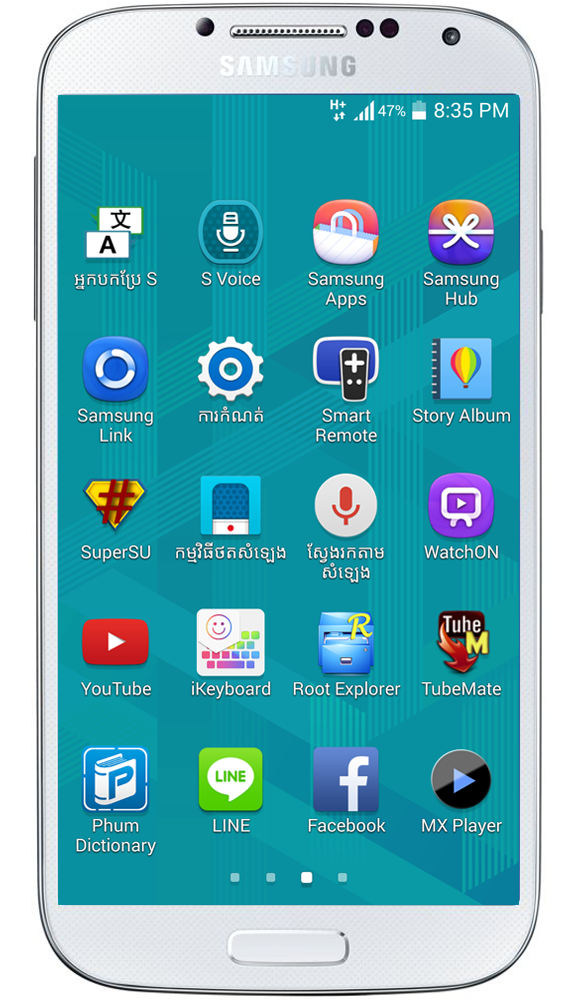


Rom Feature:
- Fix on stock 4.4.2 odex
- Auto APN no need to add (For Cambodia Carrier)
- Fix korean useless APP
- Fix dial pad
- Fix auto 3 pages app
- Note 4 weather widget
- Note 4 stock wallpapers
- Add some S5+Note 4 app
- Full Menu Khmer
- Default language = Khmer
- One file by Odin
Note: File have password if need please contact me.
Wing Account: 00774016
Phone number: 089 686860 / 010 680860
Facebook: Kok Penh
Download Link (Have Password)


